
IESCO Online Bill – Check & Download Duplicate Bill
You can enter 14-digit reference number to check IESCO Online Bill for current month. You can also download or Print the IESCO duplicate Bill Copy.
Check IESCO Online Bill
Check Your IESCO Bill
Sometimes, finding your IESCO bill at the end of month seems a daunting process if you’ve not received it at your doorstep. It’s hard for you to find duplicate IESCO online bill but there’s fewer overhead costs for you to generate bill on this website.
How to Check IESCO Online Bill by Reference Number?
Steps to check IESCO Online Bill:
- Visit easybill.pk
- Enter 14- digit reference number or 10- digit Consumer Number
- Click ” Check Bill Button”
- View your current IESCO electricity bill
- Download PDF or print duplicate copy
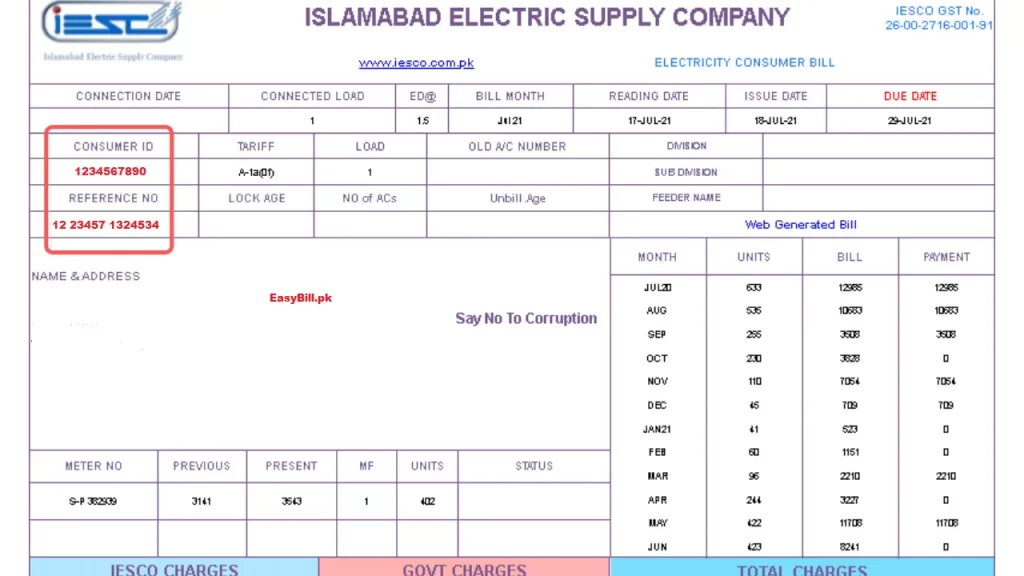
You can track and view your IESCO online bill information using your 14 digits reference number or consumer Id printed on your bill. It’s quite easy for you to find where the reference number is pointed on your bill, you can get the hint in the image below showing the reference number.
Our free website breaks all the records and provides the most convenient experience to ensure consumer needs. You’ll view, free download and generate a duplicate copy of your bill to pay your bill. You can not only track WAPDA electricity bill information for new bill but previous history monthly can also be tracked, irrespective of that if you’re an industrial consumer or commercial.
Download or Print IESCO Duplicate Bill
Consumers are encouraged to track bills and free download on this website. You can download duplicate copy of IESCO online bill by simply following the steps directed below:-
- Type 14 digits reference number carefully without space
- Press “Check Bill” button
- Hard copy of your bill will be generated
- You can save copy of your bill or print it out
- If your computer is connected to printer, type “ Ctrl + P “
- Your duplicate Iesco online bill will be printed out
What Information Is Shown on IESCO Bill?
- Consumer name & address
- Meter reading date
- Units consumed
- Bill issue & due date
- Payable & after-due amount
- Last 12 months payment history
Your printed duplicate IESCO online bill has various information printed on the bill for information.
The information consists of bill reading date, units consumed for this month, bill printing date, bill payment due date, bill payment after due date and history of previous paid bill.
You can check the paid status of the previous month bill, if it’s paid or not. The payment history of last 12 month’s bill information is printed on the bill.
You can make verification if your bill is paid or not. If you’ve not paid your bill for the previous month, it will be added to the new bill with an overdue payment amount.
Your bill also has a reference number and consumer ID printed, in order to assist users. Customer can file an online complaint, put in an application for bill correction, track information regarding new bill using the reference number or customer Id.
Where to Find IESCO Reference Number?
Your IESCO reference number is printed on the top portion of your electricity bill. It is a unique 14-digit number used to track and pay your bill online.
Can I Check IESCO Bill Without Reference Number?
Users are encouraged to check IESCO online bill using consumer number. You can not track bill information by name or through meter number.
Customer ID or reference number printed on your bill is a unique identity, used to track your bill. You can’t inquire about your bill information by CNIC or serial number.
Rest assured, if you’re an industrial or commercial consumer, to inquire about bill information by name or through CNIC, you can visit the nearest customer helping service center.
IESCO Online Bill Payment Methods
Following are the Online Bill Payment Methods:
- Commercial banks
- ATM / Credit card
- Easypaisa
- JazzCash
Payment of IESCO WAPDA electricity bill is widely accepted by all commercial banks and Pakistan Posts Office by visiting physically with a hard copy of the printed bill.
You can also deposit bills by visiting ATM-Links using your credit card. It’s quite hectic to deposit bills and waiting for long hours.
Users can also make online payments without visiting physically. You can make online bill payments if you’ve an account in a commercial bank. Some other digital apps to deposit bill online are Easypaisa and Jazzcash.
You can create an account and can make an online bill payment. To make online payments, all you need is a strong internet connection to avoid any server side failure.
New Connection IESCO Online Bill Application
IESCO is extending it’s coverage area and widely accepts installation of new connections registrations. You can apply online for new connections and track information about the connection application. Apply a new connection if you’ve not registered for IESCO WAPDA electricity connection.
IESCO Online Bill Complaints / Customer Service Centers
IESCO has launched customer service centers for online complaints. Customers can contact in case of emergency at given numbers:-
Toll Free Number for IESCO Online Bill Help 080025250.
Central complaint and monitoring cell at 051 – 9252933 – 6.
Irrespective of this, IESCO customer service centers are active to facilitate user’s. You can contact or visit in case of emergency, bill information or correction.
Also, IESCO entertains online complaints and you can file an online complaint on Customer Complaint Management System (CCMS). You can also track your complaint information using this management system.
IESCO peak hours 2026
IESCO directs clients to lessen electricity consumption when peak hours are active. It helps IESCO to deal with electricity distribution smoothly. Electricity consumption load is increased during peak hours and proper distribution of electricity may interrupt, thus causing over scheduled load shedding.
| SEASON | PEAK HOURS | OFF PEAK HOURS |
| Dec to Feb | 5 PM to 9 PM | Rest 20 Hours |
| Mar to May | 6 PM to 10 PM | -do- |
| Jun to Aug | 7 PM to 11 PM | -do- |
| Sep to Nov | 6 PM to 10 PM | -do- |
IESCO Online Bill Taxes
IESCO bill taxes are applicable on clients based on different scenarios. The taxes imposed are of category IESCO and Govt. These taxes are included in total bill payment. When a customer pays a bill, these taxes are automatically paid. Some of taxes applicable on bill are described as:-
| Charge Name | Full Form | Description | Rate / Method |
|---|---|---|---|
| FPA | Fuel Price Adjustment | Added when fuel prices fluctuate. Arrears due to fuel price changes are included in the bill. | Depends on fuel price change |
| ED | Electricity Duty | Charged based on total units consumed. | 1.5% of total units |
| TV Fee | Television Fee | Fixed TV service charges. | Rs. 35 (Industrial) Rs. 60 (Commercial) |
| GST | General Sales Tax | Applied on total bill including ED and variable charges. | 17% of (ED + Variable Charges) |
| QTR Adjustment | Quarterly Tariff Adjustment | Added every 3 months on total bill. | 1.65% of total bill |
| TR Surcharge | Tariff Rationalization (IDTR SUR) | Difference between NEPRA and Govt tariff. Govt pays subsidy if positive, consumers pay if negative. | Variable |
| FC Surcharge | Finance Cost | Added to recover revenue collection cost. | 0.43% of total units |
| Deferred Amount | — | Disputed amount due to illegal activity. No late payment is charged until resolved. | Case based |
Related Bill: