FESCO Online Bill Check 2026 – Download Duplicate Bill
Check your Fesco online bill with our user-friendly platform. You can download and print your Fesco duplicate electricity bill online.
FESCO Bill Online Check by Reference Number or Customer ID
Check Your FESCO Bill
Didn’t Receive Your FESCO Bill?
If you have not received your current month’s electricity bill and are searching for your FESCO online bill, you’re in the right place.
With EasyBill.Pk, you can:
- View your latest FESCO bill
- Download a duplicate bill PDF
- Print your bill for payment or record purposes
No registration. No charges.
How to find FESCO Bill Reference Number?
To check your FESCO bill online, you must have a 14-digit reference number, which is printed on your electricity bill.
If you’re unsure where to find it, check the top-left corner of your previous bill. A highlighted image is shown below for guidance.
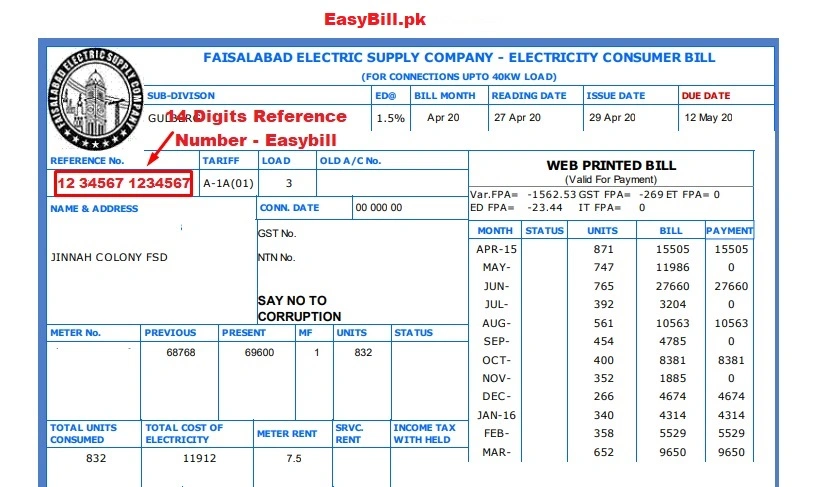
Example Reference Number
Reference number is a key factor for consumers as it highlights the installed connection information. Typically a reference number looks like:-
13 12178 1234567
Reference Number Breakdown
- Batch Number (13): Identifies the consumer batch when the connection was installed.
- Subdivision Code (12178): Represents the area or subdivision where electricity is supplied.
- Account Number (1234567): Your permanent consumer identification number.
So basically, a reference number is summed up as Batch Number + Subdivision + Account Number.
How to Download FESCO Online Bill (Duplicate Copy)
You can download your current month’s FESCO duplicate bill. You can also check the history of your previous bills if the bill is paid or not. You can sort out your paid bills history printed on the bill. You can download duplicate FESCO online bill using this free website.
- Visit the website easybill.pk.
- Type 14 digits valid reference number carefully
- Make sure there’s no space between digits
- Click on “ Check Bill ”
- If the reference number is valid, Pdf copy of your bill will be generated
- You can take print of this bill if your computer is connected to printer
- To print bill, press “Ctrl + P” and duplicate copy of bill will be printed out
In addition, you can download other electricity distribution companies duplicate bills on EasyBill website. Also MEPCO consumers can check and download duplicate bill using this website.
About FESCO (Faisalabad Electric Supply Company)
Faisalabad Electric Supply Company (FESCO) breaks all the records as it is one of the largest electricity distribution companies with over 4.01 million installed connections and splendidly covering a total of 26 million population.
Rest assured, FESCO operates in Faisalabad, which is one of the most industrial cities of Pakistan and seems to be similar to Manchester, United Kingdom. FESCO is working diligently and with splendid performance, turns out high revenue.
FESCO Potential Aims and Objectives
FESCO focuses on:
- Reliable electricity distribution
- Consumer convenience and transparency
- Expansion of power services
- Secure handling of consumer data
- Smooth and uninterrupted electricity supply
Customer satisfaction remains FESCO top priority.
FESCO Bill Covered Areas
FESCO ensures it’s services for a total of 08 circles. FESCO is responsible for distributing electricity and maintaining consumer’s records for the circles assigned. The circle covered under the FESCO are listed as:-
| Bhakkar | Toba Tak Singh | Faisalabad | Mianwali |
| Khushab | Sargodha | Jhang | Chiniot |
FESCO is keenly willing to serve these cities. You can generate your Faisalabad electricity bill (bijli bill) and the rest of the circles as well by simply providing a 14 digits reference number.
FESCO Bill Peak Hours 2024
The FESCO Peak Hours 2023 are as follows:
| Month 2023 | Peak Hours |
| December to February | 5 PM to 9 PM |
| March to May | 6 PM to 10 PM |
| June to August | 7 PM to 11 PM |
| September to November | 6 PM to 10 PM |
FESCO recommends less electricity usage during peak hours. Peak hours are considered to be the superior hours when electricity disbursement is in more demand, per unit electricity rate is up as compared to rest hours. For each season, peak hours vary as well as timings.
Consumers are requested to lessen electricity consumption when peak hours are active. Rest assured, It not only empowers FESCO to equally distribute and supply power, but also impacts users in electricity per unit rate.
What Details Are Shown on FESCO Online Bill?
Your FESCO bill includes:
- Meter reading date
- Due date
- Issue date
- Current month units
- Last 12 months payment history
- Reference number & customer ID
How to check old bill history? Old Payment history of the last 12 months on your bill points out status regarding bill paid or not paid. Most importantly, you’ll also find the reference number and consumer ID on your bill.
FESCO Online Bill Requirements
To check or download your bill, you only need:
- 14-digit reference number or 10-digit Customer ID
You cannot check FESCO bill using:
- CNIC
- Name
- Meter number
If you’ve not remembered your reference number, you can visit the nearest FESCO office and inquire about your bill information.
How to check Fesco bill using meter Number? You can’t track your Wapda electricity bill by name and meter number. Same like, you can’t find bill details through CNIC/ NIC or ID card number. Consumer’s can only inquire about a new bill using a reference number.
FESCO Bill SMS Registration
FESCO has introduced an outstanding feature of SMS Service for it’s valuable customers in order to facilitate about the billing information and electricity distribution. FESCO aims to respond to customers through SMS. Register Mobile number to activate SMS service against your reference number.
FESCO Bill Payment Methods
FESCO Bill Offline Payment
- Commercial banks
- Pakistan Post offices
- NADRA e-Sahulat centers
FESCO Bill Online Payment
- Easypaisa
- JazzCash
- Mobile banking apps
- ATM links
FESCO New Connection
Consumers can apply for a new electricity connection online by:
- Filling the online application
- Uploading required documents
- Submitting to the concerned subdivision
Application status can also be tracked online. After filling online registration, required documents are attached and submitted to the concerned subdivision office. Register New Connection and fill out an online application.
FESCO Helpline / Telephone Directory
FESCO responds to customers’ queries and resolves them related to over billing, new connection installation tracking problems and bill correction. It has also provided telephone directories of individual circles. Consumers’ can track concerned helpline numbers by Name, Designation, City, and circle wise. You can inquire about contact details and Telephone Directories.
FESCO Complaints Online
FESCO provides support for:
- Overbilling
- New connection tracking
- Bill correction
- Power complaints
You can register complaints online through the Customer Complaint Management System (CCMS).
Consumers can select the type and category of complaint and write a short description related to the complaint. You can file an online complaint.
FESCO Bill Taxes
FESCO imposed taxes on consumers to meet electricity disbursement expenses. When consumers deposit bill, these taxes are added to the bill amount and are paid. Taxes are of two categories, added by FESCO and Govt. Taxes added in FESCO online bill are listed:-
FPA
Fuel Price Adjustment (FPA) is not a fixed tax included in the bill. It is not always imposed on consumers. FPA is collected only when petroleum prices fluctuate. The petroleum prices fluctuation is directly linked with FPA tax. It can be charged for any previous month as arrear and added in the new bill. It is calculated as total units consumed multiplied per unit FPA tax.
TV Fee
Television fee is a fixed tax added to bills by Govt. It is not mandatory to have television at home. It is collected for each connection registration. For industrial consumers, TV Fee is Rs. 35 and for commercial users, it is Rs. 60.
QTR Surcharge
It is added after every 3 months if the units consumed are more than 300 units. Consumers with 300 units plus consumption pay it quarterly.
Disputed Amount
It is added in the bill if there’s some kind of invalid activity or fine is imposed on the consumer. It’s Fesco jurisdiction to lessen or increase disputed amounts.
TR Surcharge
Tariff Rationalization Surcharge is the difference of tariff between NEPRA and Govt. If the tariff difference is positive, Govt. provides subsidies to consumers. In case, tariff difference is negative, FESCO collects TR surcharge tax from consumers and pays to the Govt.
Frequently Asked Question (FAQs)